Co-authored with AI
An interactive collaboration where draft content and structure were co-developed between human and AI before human review and publication.
- Editorially responsible
- Ahmed Chaabni
- Human review
- Model
gemini-3.8-flash
Disclosed under Article 50, Regulation (EU) 2024/1689.
Governance policy · Machine-readable record
Why You Should Ditch Next.js for Websites (and How Astro Rescues Your Architecture)
Next.js taxes content sites with RSC boundaries, cache tiers, and upgrade churn. Here is why teams are moving their content layer to HTML-first Astro.

AI-Generated Image
This visual asset was synthesized using an AI image diffusion model.
Disclosed under Article 50, Regulation (EU) 2024/1689.
Governance policy · Machine record
For nearly half a decade, web engineering teams operated under a shared default: if a project touched React, you built it on Next.js.
It did not matter whether you were architecting an authenticated multi-tenant enterprise dashboard, an e-commerce catalog, a developer documentation portal, or a company marketing site. Next.js was the safe, uncontroversial default.
Today, that default has become an architectural liability.
Engineering teams migrating away from Next.js for their content and marketing sites report the same systemic frustrations: cognitive overload from React Server Components (RSC), complex caching behaviors, creeping vendor lock-in, endless version upgrade churn, and megabytes of client-side JavaScript shipped for pages that are fundamentally documents.
If your site exists primarily to inform, convert, rank, or be cited by AI engines, defaulting to Next.js is often the wrong technical choice. Here is the case for ditching Next.js on content-driven sites, and how Astro replaces it with a cleaner, faster, and more sustainable architecture.
The Fundamental Misalignment: Document vs. Application
To understand why Next.js causes friction on content sites, we have to look at the fundamental question each framework asks:
- Next.js asks: “How should this React application fetch data, render components, and route across the client and server?”
- Astro asks: “What small parts of this HTML document actually require client JavaScript?”
Next.js treats everything as a React application. Even when generating static output, you are still inside a full-stack React runtime that expects hydration, client-side routing reconciliation, and complex boundary declarations.
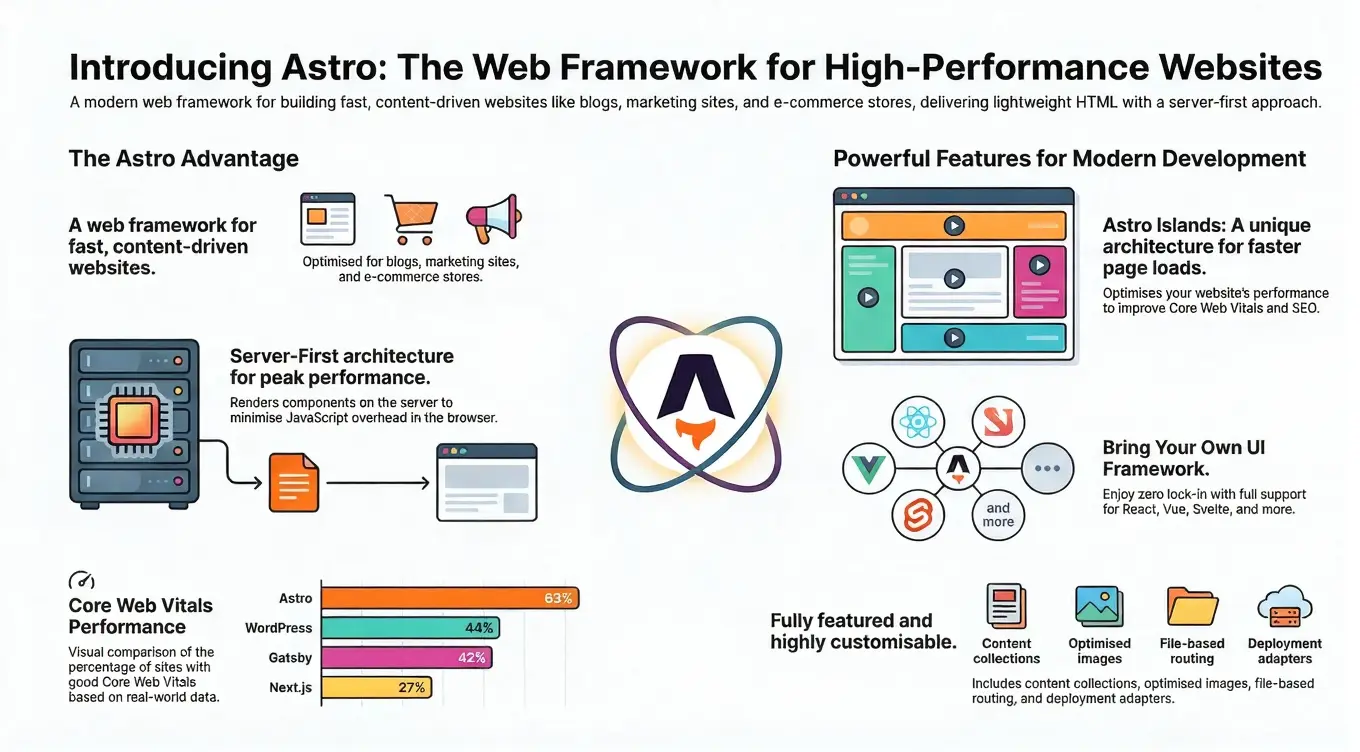
Astro is HTML-first. It treats the web as documents enhanced with isolated pockets of interactivity. It outputs plain, static HTML and CSS by default. JavaScript only touches the client when you explicitly demand it.
graph LR
    classDef browserNode fill:#f8fafc,stroke:#64748b,stroke-width:2px,color:#0f172a,rx:8px,ry:8px;
    classDef nextNode fill:#eff6ff,stroke:#3b82f6,stroke-width:2px,color:#1e3a8a,rx:8px,ry:8px;
    classDef astroNode fill:#f0fdf4,stroke:#22c55e,stroke-width:2px,color:#14532d,rx:8px,ry:8px;
    classDef islandNode fill:#fefce8,stroke:#eab308,stroke-width:2px,color:#713f12,rx:8px,ry:8px;

    subgraph NextDefault ["Next.js Default"]
        NextPayload["HTML<br/>+ React Runtime<br/>+ Hydration Payloads<br/>+ Router<br/>+ Tree State"]:::nextNode --> NextBrowser["Browser"]:::browserNode
    end

    subgraph AstroDefault ["Astro Default"]
        AstroPayload["Pure Static HTML + CSS<br/>(0 KB JS Runtime)"]:::astroNode --> AstroBrowser["Browser"]:::browserNode
        AstroBrowser -.->|"hydrated independently"| Island["Interactive Island"]:::islandNode
    end
6 Reasons to Ditch Next.js for Your Content Layer
1. The Hydration Tax and Core Web Vitals
When a visitor lands on a Next.js page, the browser downloads the HTML, but it must also download, parse, and execute the React runtime and component bundles before the page is fully interactive.
On desktop connections, modern machines can brute-force this overhead. On mobile devices with CPU throttling or variable network conditions, this hydration cycle degrades your Interaction to Next Paint (INP) and Total Blocking Time (TBT).
A standard Next.js page frequently ships between 80 KB and 250 KB of baseline client JavaScript before you add your first line of custom interactive logic. In Astro, that baseline is strictly 0 KB.
If your page consists of an article, a pricing table, a case study, and customer testimonials, paying a 150 KB JavaScript penalty simply to display formatted text is architectural waste.
2. RSC Cognitive Overload and Boundary Friction
The App Router introduced React Server Components to reduce client bundle sizes. What it introduced alongside that reduction is a permanent tax on how your team reasons about every component:
- The Directive Boundary: Constantly declaring
'use client'at module boundaries. - Serialization Constraints: Data passed from Server Components to Client Components must be serializable. You cannot pass functions, classes, or event handlers directly across the boundary.
- Accidental Leaks: One misplaced import inside a Client Component sub-tree can pull massive server-side libraries or heavy utility modules into the client bundle.
- Debugging Friction: Stack traces now span edge runtimes, server Node processes, and client browser contexts, turning simple debugging into a multi-layer tracing exercise.
None of this overhead buys an editorial team, a marketing engineer, or a CMS platform anything at all. You are paying application-architecture costs to publish documents.
3. The Multi-Tier Caching Maze
Few framework decisions have caused as much debate as Next.js caching. With four interdependent cache tiers (Request Memoization, Data Cache, Full Route Cache, and the client-side Router Cache), predicting when a page or data fetch updates has become notoriously difficult.
Developers regularly encounter:
- Stale data persisting after content updates in headless CMS platforms.
- Complicated revalidation pipelines (
revalidatePath,revalidateTag) required for routine static content refreshes. - Subtle differences between local development mode (
next dev) and production server builds (next build && next start).
While Next.js 15 backed away from aggressive default fetch caching, the underlying mental model remains complex.
4. The “Two-Version Trap”: Upgrade Churn and Breaking Changes
The trap is simple: by the time your team finishes migrating to the current major version, the next one has already redefined the patterns you just adopted, so you are permanently maintaining two mental models at once. One of the heaviest hidden costs of maintaining a Next.js codebase is this architectural churn. Instead of delivering customer-facing features, engineering teams find themselves allocating recurring sprints simply to survive major framework updates.
This is not the ordinary cost of a framework maturing. It is a predictable lifecycle in which a feature introduced as the recommended future pattern later gets reversed, renamed, deprecated, or replaced by a fundamentally different mental model:
- Experimental launch: A feature ships under an experimental or beta flag.
- Ecosystem push: The community and marketing promote it as the future standard.
- Production adoption: Teams build critical production conventions around it.
- Real-world breakdown: Scale, correctness, DX, or security flaws emerge in production.
- The reversal/rename: The framework changes defaults, alters APIs, or renames conventions.
- Instant technical debt: The previous implementation becomes an architectural liability.
Because Next.js bundles React evolution, routing, rendering, caching, server infrastructure, and Vercel deployment concepts into a single framework, major shifts carry a massive blast radius across your application.

AI-Generated Image
This visual asset was synthesized using an AI image diffusion model.
Disclosed under Article 50, Regulation (EU) 2024/1689.
Governance policy · Machine record
Timeline of High-Impact Breaking Changes (Next.js 12 to 16)
| Version | Major Introduction | Why It Later Became Problematic |
|---|---|---|
| Next.js 12 | Middleware (middleware.ts), SWC compiler, Pages Router maturity | Middleware was widely adopted as an auth gate. In 2025, CVE-2025-29927 documented a critical authorization bypass affecting versions 11.1.4 through 15.2.2 via a crafted subrequest header. |
| Next.js 13 | App Router, React Server Components, app/ directory | Introduced a second routing and data-fetching architecture alongside Pages Router, creating massive migration debt and ecosystem fragmentation. |
| Next.js 13.4 | App Router declared stable | Teams standardized on App Router patterns that subsequently saw their core cache defaults and request APIs overhauled in version 15. |
| Next.js 14 | Server Actions stabilized, cache-heavy defaults, experimental PPR | Caching defaults were completely reversed in 15; experimental APIs like Partial Prerendering shifted or were superseded. |
| Next.js 15 | React 19 requirement, async request APIs, uncached-by-default fetch & GET routes | Synchronous request helpers and implicit caching broke across codebases, altering latency, fresh-data behavior, and hosting costs. |
| Next.js 16 | Async APIs strictly enforced, middleware.ts renamed/deprecated to proxy.ts, Turbopack default | Synchronous fallback removed; middleware.ts renamed to proxy.ts (skipProxyUrlNormalize); cache invalidation APIs (revalidateTag) required explicit cache profiles. |
The Caching U-Turn
Two years of revalidatePath and revalidateTag workarounds, invalidated by a single major release.
In Next.js 13 and 14, the framework operated on one rule: cache aggressively by default, opt out when you need freshness. fetch() calls and GET route handlers were cached implicitly.
In Next.js 15, the maintainers performed a complete 180-degree reversal:
| Behavior | Next.js 14 | Next.js 15+ |
|---|---|---|
fetch() default | Cached by default (force-cache) | Uncached by default (no-store) |
| GET Route Handlers | Cached by default | Uncached by default |
| Client Navigation Cache | Reused page data aggressively | Page data uncached by default |
| Developer Assumption | “Opt out of caching for dynamic freshness” | “Opt into caching for reusable data” |
Why did this become a problem? Developers found the implicit caching impossible to reason about. Stale CMS updates persisted, cart states leaked, and local development diverged from production. But for teams that spent two years crafting custom revalidatePath and revalidateTag workarounds to tame version 13, Next.js 15 rewarded them with another migration sprint just to audit data freshness and re-introduce explicit caching where needed.
The Async Request APIs Whiplash
Every cookies(), headers(), params, and searchParams call site in the codebase, plus the helpers wrapping them.
In Next.js 13 and 14, request parameters, search queries, and cookies were accessed synchronously. In Next.js 15 they began returning Promises, and in Next.js 16 the synchronous compatibility layer was removed outright:
export default function BlogPost({ params,}: { params: { slug: string };}) { const { slug } = params; const token = cookies().get('session'); return <article>{slug}</article>;}export default async function BlogPost({ params,}: { params: Promise<{ slug: string }>;}) { const { slug } = await params; const cookieStore = await cookies(); const token = cookieStore.get('session'); return <article>{slug}</article>;}This change broke far more than simple page components:
- Helper functions and shared utility libraries had to be rewritten to propagate Promises upwards.
generateMetadatafunctions and route handlers required restructuring.- Test mocks, fixture generators, and third-party UI packages broke until upstream maintainers issued version-specific updates.
The Middleware Auth Illusion
Every application that trusted middleware as its authorization gate was bypassable with one HTTP header.
When Next.js introduced middleware.ts, it became the standard pattern in official templates and community tutorials for route protection, A/B tests, and authentication gates.
In 2025, the disclosure of CVE-2025-29927 exposed the fatal flaw in this pattern: applications relying solely on middleware for authorization could be completely bypassed using a crafted x-middleware-subrequest HTTP header. This vulnerability affected releases spanning from Next.js 11.1.4 all the way through 15.2.2.
Recognizing that middleware had been conceptually overloaded, Next.js 16 deprecated middleware.ts in favor of proxy.ts (with configuration shifting from skipMiddlewareUrlNormalize to skipProxyUrlNormalize), formally clarifying that this layer is a network-level proxy rather than application security middleware.
The Moving Target of Experimental APIs
Every feature a team adopted early, on the strength of official encouragement, turned into a migration ticket when the flag behind it was renamed or deleted.
Next.js routinely introduces major capabilities behind experimental flags, encouraging teams to adopt them early:
- Partial Prerendering (PPR): Marketed heavily in version 14 as the future of hybrid rendering (
experimental.ppr), the API and configuration continued to churn and evolve through version 16. - Cache Flags: Experimental flags like
dynamicIOanduseCachewere renamed, folded intocacheComponents, or removed outright between versions 15 and 16. - Tag Invalidation: In Next.js 16,
revalidateTag(tag)changed so TypeScript users must provide a mandatory cache-life profile, such asrevalidateTag('posts', 'max').
5. Gravitational Pull Toward Vercel (“The Platform Tax”)
Next.js is open source, but its advanced features are designed to work most smoothly on Vercel: fine-grained Incremental Static Regeneration (ISR), tag-based revalidation, edge middleware, and image optimization.
When deploying Next.js to independent infrastructure (Cloudflare Workers, AWS Lambda via OpenNext, or self-hosted Docker containers), teams must take on operational overhead:
- Configuring image optimization caches and
sharpbinaries. - Setting up Redis or shared storage backends for multi-instance cache synchronization.
- Managing Node.js container memory limits and handling cold starts under traffic spikes.
If platform neutrality, predictable infrastructure billing, and simple CI/CD pipelines matter to you, understand what you are choosing: Next.js is not a neutral default, it is a bet on someone else’s platform roadmap.
6. SEO and GEO (Generative Engine Optimization)
Both search engines (Google, Bing) and AI generative retrieval systems (Perplexity, ChatGPT Search, Claude, Google Gemini) prioritize clean, deterministic, immediately parseable HTML.
While search crawlers can execute JavaScript, AI crawlers and automated research bots frequently do not wait for client-side hydration or streaming Suspense boundaries to settle. If critical definitions, structured JSON-LD schemas, or comparison tables are trapped behind client components, machine discoverability suffers.
Astro serves the complete semantic document in the initial HTTP response.

AI-Generated Image
This visual asset was synthesized using an AI image diffusion model.
Disclosed under Article 50, Regulation (EU) 2024/1689.
Governance policy · Machine record
How Astro Solves These Problems
Astro was designed from the ground up for content-focused web properties. It strips away the unnecessary full-stack application machinery while preserving modern developer ergonomics.
| Capability | Next.js (App Router) | Astro |
|---|---|---|
| Default Output | React tree requiring client hydration | Pure static HTML / CSS |
| Client JS Baseline | 80–250 KB (React + Router runtime) | 0 KB |
| Component Architecture | React only (Server / Client Components) | Islands Architecture (React, Vue, Svelte, or native) |
| Dynamic Capabilities | SSR / ISR / Server Actions | Static CDN, Edge SSR, or Server Islands |
| Content Authoring | Custom MDX setup or external headless CMS | Native Content Collections with typed Zod validation |
| Hosting Portability | Smoothest on Vercel; complex self-hosting | Deployable anywhere: Cloudflare Workers, S3, Netlify, VPS |
| Infrastructure Cost | Serverless compute or continuous Node servers | Zero/near-zero compute on global CDNs |
| API & Upgrade Stability | High churn, frequent paradigm shifts, async prop rewrites, caching reversals | Anchored to Web Standards (Request/Response, HTML); additive, non-breaking evolution |
1. Zero-JS Islands Architecture
Astro does not force you to abandon React. Instead, it allows you to use your existing React components as isolated islands:

AI-Generated Image
This visual asset was synthesized using an AI image diffusion model.
Disclosed under Article 50, Regulation (EU) 2024/1689.
Governance policy · Machine record
---import Layout from '../layouts/Layout.astro';import PricingHeader from '../components/PricingHeader.astro'; // Pure HTML, 0 KB JSimport PricingCalculator from '../components/PricingCalculator.jsx'; // React Componentimport FAQ from '../components/FAQ.astro'; // Pure HTML, 0 KB JS---
<Layout title="Pricing">  <PricingHeader />
  <!-- Only this component loads React and executes client-side JavaScript -->  <PricingCalculator client:visible />
  <FAQ /></Layout>
With client:visible, Astro does not even load the React bundle until the visitor scrolls the calculator into view. The rest of the page remains fast, accessible HTML.
2. Multi-Framework Freedom
In Next.js, your entire tech stack is locked to React. If your team wants to build a lightweight widget in Svelte, integrate a Vue calendar, or use vanilla web components, you cannot do so without awkward shims.
Astro is UI-agnostic. You can mount React components next to Svelte components on the exact same page, sharing the same design tokens and props.
3. Server Islands for Instant Dynamic Content
A frequent argument for Next.js SSR was the need for dynamic personalization (e.g., displaying user avatars, cart counts, or geolocation data).
Astro solved this with Server Islands. You can cache the entire page shell statically on a global CDN, while deferring dynamic components to render in parallel without blocking the initial page response:
---import UserProfile from '../components/UserProfile.astro';---
<!-- Page shell loads instantly from CDN; UserProfile streams in asynchronously --><UserProfile server:defer>  <div slot="fallback" class="avatar-skeleton"></div></UserProfile>
4. Native, Type-Safe Content Collections
For blogs, documentation, and technical portals, managing content in Next.js usually requires wiring third-party plugins (next-mdx-remote, contentlayer, etc.), which frequently break during major framework updates.
Astro includes Content Collections directly in the core framework. Content schema validation is guaranteed at build time via Zod:
import { defineCollection } from 'astro:content';import { glob } from 'astro/loaders';import { z } from 'astro/zod';
export const collections = {  post: defineCollection({    loader: glob({ pattern: '**/*.mdx', base: 'src/data/post' }),    schema: z.object({      title: z.string(),      publishDate: z.date(),      category: z.string(),      tags: z.array(z.string()),    }),  }),};
If an editor forgets a required metadata property or inputs an invalid date, the build fails immediately with a descriptive error before broken pages hit production.
5. First-Class Cloudflare and Edge Deployment
Following Cloudflare’s acquisition of the Astro Technology Company in January 2026, Astro has become the premier edge-native framework.
Static Astro sites build directly into static assets distributed across Cloudflare’s global edge network. When dynamic behavior is required, @astrojs/cloudflare compiles clean serverless endpoints that execute directly on Cloudflare Workers with zero container overhead, sub-millisecond cold starts, and minimal hosting costs.
6. Architectural Stability Anchored to Web Standards
Perhaps the most valuable advantage for engineering teams is release serenity.
Because Astro is fundamentally an HTML-first framework that compiles to standard web primitives, it avoids inventing proprietary runtime semantics for basic HTTP concepts:
- Standard Web APIs: In Astro endpoints, middleware, and page scripts, you work directly with standard
RequestandResponseobjects, the exact same interface standardized by WHATWG and executed by browsers and edge workers worldwide. - Additive, Non-Destructive Enhancements: When Astro shipped major innovations, such as View Transitions in Astro 3, Server Islands in Astro 4.12, and the unified Content Layer in Astro 5, existing projects kept running without a rewrite. The Content Layer is the one migration that touched existing code: it moved
src/content/config.tstosrc/content.config.tsand swappedslugforid. That was a mechanical rename, not a new rendering paradigm. You don’t wake up to find your routing helpers or layout parameters converted into Promises overnight. - No Codebase Invalidation: A
.astrocomponent written three years ago produces the exact same clean, semantic HTML today. It doesn’t become technical debt simply because an upstream vendor decided to rethink its compiler paradigm.
The Pragmatic Rule: When NOT to Ditch Next.js
Next.js still has a job. It is a far narrower job than the industry’s default behavior implies, but it is a real one:
graph TD
    classDef questionNode fill:#f8fafc,stroke:#64748b,stroke-width:2px,color:#0f172a,rx:8px,ry:8px;
    classDef astroNode fill:#f0fdf4,stroke:#22c55e,stroke-width:2px,color:#14532d,rx:8px,ry:8px;
    classDef nextNode fill:#eff6ff,stroke:#3b82f6,stroke-width:2px,color:#1e3a8a,rx:8px,ry:8px;

    Start{"What are you building?"}:::questionNode

    Start -->|"Content-First"| Content["Marketing sites, Blogs, Portals<br/>Docs, Programmatic SEO<br/>Catalog Stores"]:::astroNode
    Start -->|"App-First"| App["Authenticated SaaS<br/>Complex Dashboards<br/>Realtime Workspaces"]:::nextNode

    Content --> Astro["Choose ASTRO<br/>Zero JS by default, fast,<br/>cheap, multi-framework"]:::astroNode
App --> Stack["Pick an app stack<br/>React + Vite, Next.js,<br/>or whatever your team runs"]:::nextNode- Reach for an application stack if you are building an authenticated web application with dense client-side state, deep interactive dependencies across multiple screens, or a unified SaaS product where every view requires real-time user mutations. React with Vite, Next.js, Remix, TanStack Start, or whatever your team already knows will all serve that job. The category is real. It is simply not the category most teams are in when they reach for it, and Next.js is not the only answer to it.
- Ditch Next.js for Astro if your project is a marketing website, corporate homepage, documentation hub, technical blog, or e-commerce display surface.
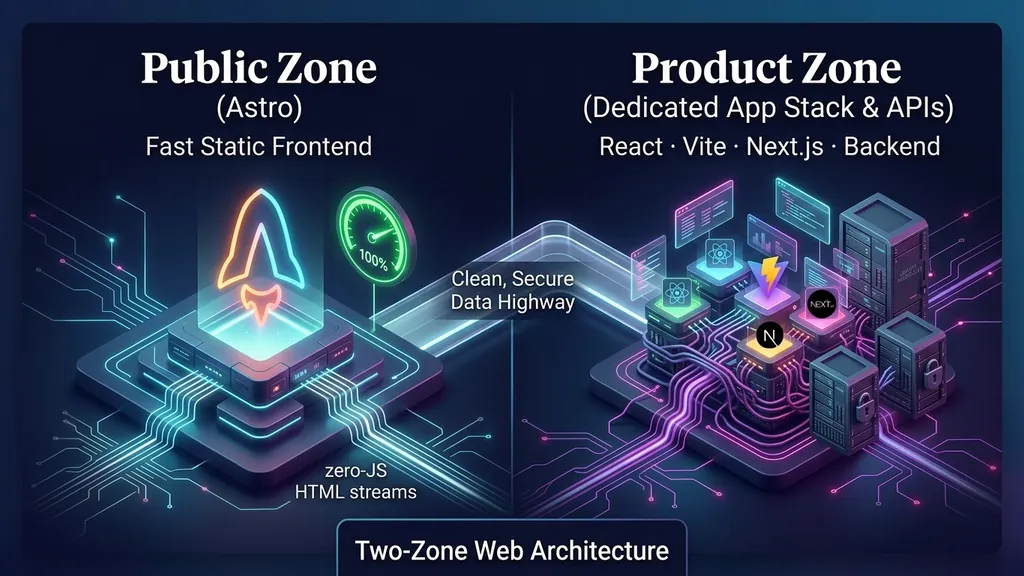
The Recommended Architecture: The Two-Zone Topology
The answer is structural, not tribal. Split the two concerns so that neither one dictates the other:
- Public Zone (
gladtek.com): Built with Astro. Deployed on global edge CDNs. Focused on speed, SEO, GEO, authoring ease, and minimal operational cost. - Product Zone (
app.gladtek.com): A dedicated application stack tailored to your product’s actual complexity. Next.js is not a mandatory default here: teams often find greater long-term stability using a clean React / Vite SPA, an alternative full-stack framework (Remix / TanStack Start), or a backend-rendered architecture (Vaadin / Spring Boot, Go, or Python), connected to dedicated domain services.
This separation prevents product engineering complexity from slowing down marketing initiatives, while keeping public content fast enough to compete on Core Web Vitals.
AI-Generated Image
This visual asset was synthesized using an AI image diffusion model.
Disclosed under Article 50, Regulation (EU) 2024/1689.
Governance policy · Machine record
The Architect’s Playbook: If You Maintain Next.js in the Product Zone
If your team chooses or inherits Next.js for your authenticated application zone, adopt these 8 rules to insulate your core business logic from framework churn:
- Do not use experimental APIs for core workflows: Treat flags like
ppr,dynamicIO, oruseCacheas prototypes, not platform contracts. - Make caching explicit per route: Never trust framework “smart defaults”. Explicitly declare cache durations, cache keys, invalidation triggers, and fallback behaviors for every data source.
- Never rely on middleware /
proxy.tsfor security: Middleware is a routing and UX convenience layer. Enforce all permissions independently inside your backend domain services, route handlers, or database row-level security. - Create a framework adapter layer: Wrap
cookies(),headers(), navigation, and metadata utilities behind internal application helpers. If Next.js changes their function signatures again, you only update one adapter module. - Decouple domain logic from Server Actions: Keep core business operations inside pure, framework-agnostic service classes that can be tested independently and invoked from CLI tools, queue workers, or alternative frontends.
- Maintain explicit rendering contracts: Document for each route whether it is static, dynamic, personalized, or cached.
- Pin dependencies and upgrade deliberately: Avoid auto-merging major Next.js upgrades. Treat upgrades as deliberate engineering projects with production-like staging tests, load tests, and security audits.
- Anchor business logic in a dedicated backend: A robust domain backend (such as Java/Spring Boot, Go, or NestJS) paired with Next.js strictly as a frontend presentation/BFF layer shields your core business assets from frontend framework volatility.
Conclusion: Stop Using the Application Hammer for Document Nails
Next.js makes you run an application in order to publish a document. Astro just publishes the document.
When you use Next.js to publish static content, you force the browser, your infrastructure, and your engineering team to pay an application tax on pages that simply need to deliver information.
By switching your content layer to Astro, you regain:
- Predictable performance: Zero client JavaScript by default.
- Operational serenity: True static assets deployable on any CDN with zero maintenance.
- Architectural clarity: Straightforward mental models without RSC boundary constraints or cache debugging.
- Freedom of choice: The ability to leverage React where it matters without locking your entire stack to it.
Next.js was the right answer for the previous generation of monolithic React deployments. It was never the right answer for a document. For modern, discoverable, and high-performance websites, Astro is the standard.
About the Authors

Co-written with AI

Advanced AI model by Google, collaborating with the Gladtek team on web engineering, enterprise architecture analysis, and full-stack performance optimization.